Where we left off
Lesson 2's flow sent whatever you typed straight to Gemini, no shaping at all. Most real flows want to wrap the user's input in something, instructions, examples, formatting, before it reaches the model. That's what the Prompt Template component is for.
Do this yourself
- Start a new flow (or clear Lesson 2's canvas).
- Drag a Chat Input onto the canvas.
From Models & Agents, drag a Prompt Template component onto the canvas. In its Template field, type:
Answer as if you were a pirate.User: {user_input}Answer:The moment you type
{user_input}, Langflow adds a new input field to the component nameduser_input, matching what's in the braces. Compare to this screenshot of exactly this: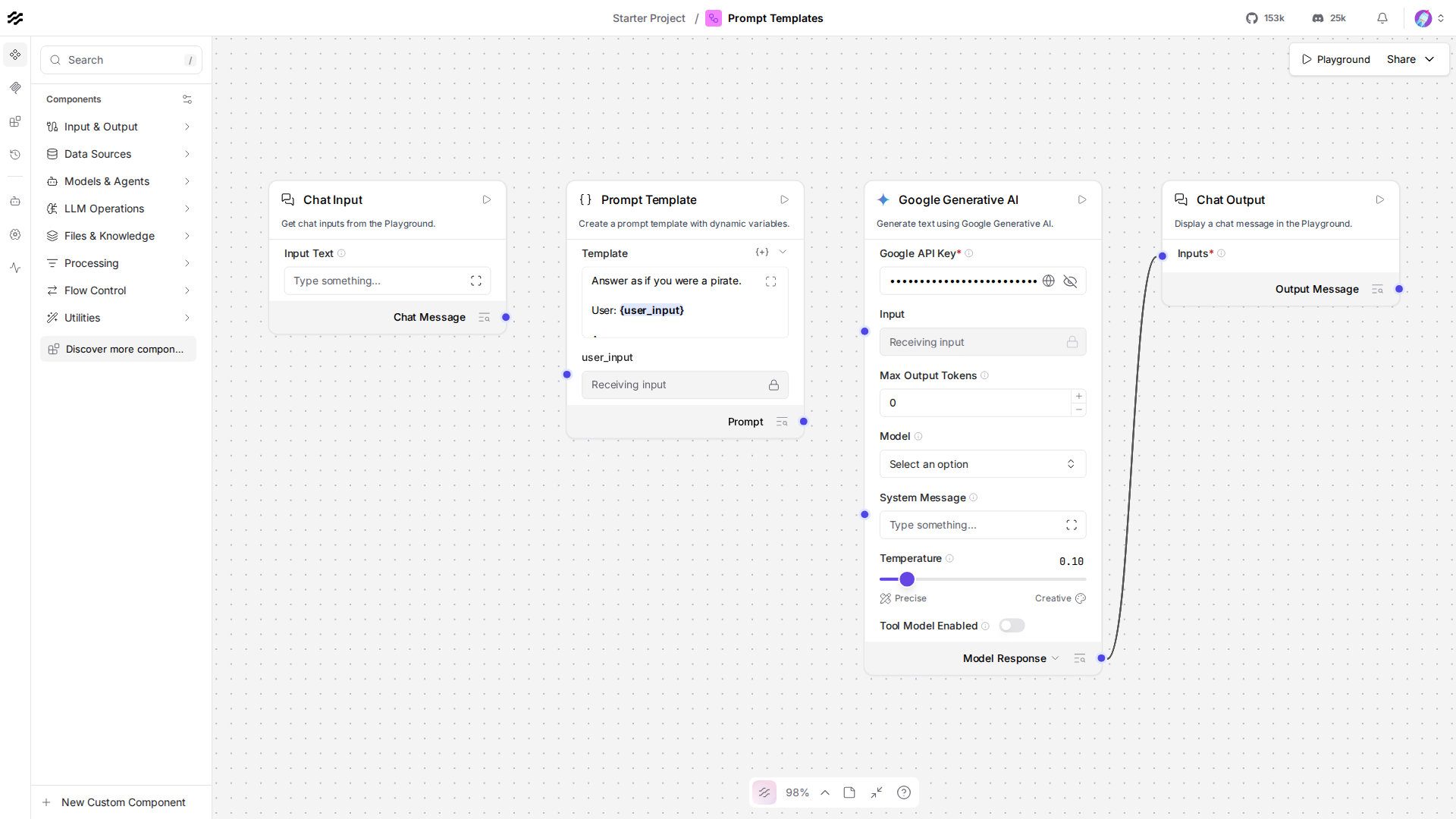
- Connect Chat Input's output to the Prompt Template's new
user_inputinput. - Add a Google Generative AI component (same setup as Lesson 2: your API key, model set to
gemini-3.5-flash-lite) and a Chat Output, and connect Prompt Template's Prompt output into the Google Generative AI component's Input, then its output into Chat Output. - Open the Playground, ask something ordinary ("What's the weather like?"), and confirm the answer comes back in pirate voice, that's the template doing its job.
The code, piece by piece
prompt = PromptComponent()prompt.set( template="Answer as if you were a pirate.\n\nUser: {user_input}\n\nAnswer:", user_input=chat_input.message_response,)template is a plain string with {user_input} inside it, the same {name} syntax as Python's own str.format(). Setting user_input= to chat_input.message_response is the code form of the connection you dragged in the browser: whatever Chat Input produces fills in that slot every time the flow runs.
gemini.set(input_value=prompt.build_prompt)build_prompt is the Prompt component's output, the fully filled-in string (template with {user_input} replaced), wrapped as a Message so it can feed straight into Gemini's input_value, the same Message-typed contract from Lesson 3.
Checkpoint
- Prompt Template: a component that wraps user input (or any connected value) inside a larger string,
{variable}placeholders become real input ports automatically. - one template, many variables: every
{name}in the template adds its own connectable input, not just one. build_prompt: the component's output, aMessagecarrying the fully filled-in string, ready to feed a model the same way raw chat input does.
If anything here still feels unclear, ask before moving to Lesson 5.