Where we left off
Lesson 6 showed a flow that forgets everything between messages, each run starts clean, no idea what was asked a moment ago. That's the default. This lesson fixes it: two pieces, a session_id to group messages together, and a Message History component to read them back out.
Do this yourself
- Build on the Lesson 4 flow (Chat Input -> Prompt -> Google Generative AI -> Chat Output), or reopen it.
- From Models & Agents, drag a Message History component onto the canvas, set its Mode to Retrieve.
- Open Chat Input's settings and set Session ID to a fixed string like
demo-session(leave it blank and Langflow generates a random one per run, which defeats the point). Set Chat Output's Session ID to the exact same string. - Add a new
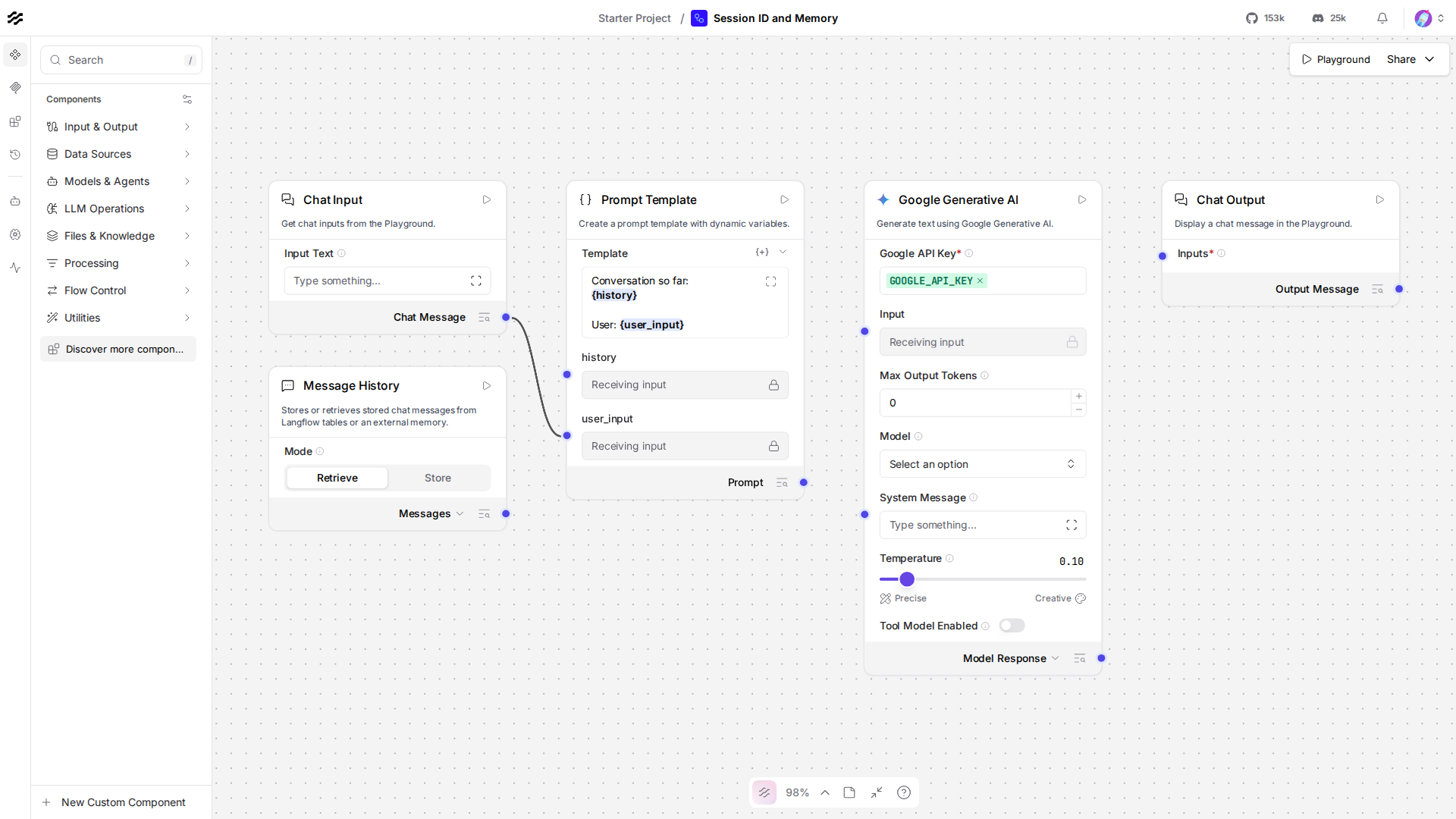
{history}variable to the Prompt Template (alongside the{user_input}from Lesson 4), and connect Message History's output into it. Open the Playground, tell it something ("My favorite color is teal."), then in your next message ask "what's my favorite color?" and confirm it actually remembers this time. Compare to this screenshot of this flow:
Why this lesson uses the REST API, not run_flow_from_json
Message history lives in the server's own database, keyed by session_id. run_flow_from_json is a self-contained, in-process call, running it twice in the same script gives you two independent executions with nothing shared between them, so the second call would never see what the first one stored. Only a real request against the running server, the REST API, reads and writes that same shared history. Lesson 11 covers the REST API on its own terms, this lesson borrows just enough of it now because it's the only path that actually demonstrates memory working.
The code, piece by piece
chat_input = ChatInput()chat_input.set(session_id=session_id)Every message Chat Input handles gets stored under this session_id, automatically, that storage is what Message History reads back later. Chat Output does the same on the way out, so the model's own replies get stored too, not just what the user typed.
memory = MemoryComponent()memory.set(session_id=session_id)MemoryComponent (the "Message History" box you dragged) reads everything stored under a session_id and hands it back as one block of text through retrieve_messages_as_text, the whole point of giving it the same session_id as Chat Input and Chat Output.
prompt.set( template="Conversation so far:\n{history}\n\nUser: {user_input}\n\nAnswer:", history=memory.retrieve_messages_as_text, user_input=chat_input.message_response,)Two variables in one template now, {history} (everything said so far) and {user_input} (this turn's message), both wired in as connections exactly like Lesson 4's single-variable version.
first = run_flow(flow_id, "My favorite color is teal.", SESSION_ID)second = run_flow(flow_id, "What is my favorite color?", SESSION_ID)Two separate REST calls, same flow_id, same session_id. The second call's Memory component reads back what the first call's Chat Input and Chat Output stored, that's the entire mechanism, nothing about the model itself changed since Lesson 4.
Checkpoint
session_id: the key Chat Input/Chat Output store messages under, give two calls the same one and they share history.- Message History (
MemoryComponent): reads everything stored under asession_idback out as text, feed it into a Prompt Template's{history}variable to give the model context. - why REST here: shared history lives in the server's own database, only a real request against the running server reads and writes it.
If anything here still feels unclear, ask before moving to Lesson 9.